Artikel | 23. April 2026
Ransomware Protection
The Complete Guide for IT Decision-Makers
is the most costly threat facing organizations today. According to Bitkom 2024, cyberattacks caused damages exceeding EUR 266 billion (Bitkom Wirtschaftsschutz 2024; 2025: already EUR 289bn) — ransomware is the most common attack form and generates the highest individual losses. BSI (German Federal Office for Information Security) rates ransomware as the greatest operational threat for organizations and public authorities in its current situation report.
This guide is for IT managers, CISOs, and security officers who need to protect their organization against ransomware — not with hope, but with architecture. It answers the questions that matter in practice:
- How do modern ransomware campaigns attack your backup infrastructure?
- Which protection architectures work — and which only look good on paper?
- What do BSI, the , and critical infrastructure requirements specifically demand?
- Which steps are needed now?
Reading time: approx. 25 minutes | Last updated: April 2026
Ransomware
Ransomware is malware that encrypts data on infected systems and demands a ransom for decryption — with the goal of forcing organizations and public bodies to pay by paralyzing their operations.
NIS2
The NIS2 Directive (EU 2022/2555) is an EU regulation that obliges essential and important entities to implement specific cybersecurity measures — including demonstrable backup management, crisis management and reporting obligations — with personal liability for management bodies in case of non-compliance.
NIS2
The NIS2 Directive (EU 2022/2555) is an EU regulation that obliges essential and important entities to implement specific cybersecurity measures — including demonstrable backup management, crisis management and reporting obligations — with personal liability for management bodies in case of non-compliance.
- 1. What is ransomware
- 2. How ransomware attacks your backups
- 3. Backup strategies in the ransomware context
- 4. Air gap: The only physical protection
- 5. BSI recommendations and regulatory requirements
- 6. Critical infrastructure and NIS2
- 7. Ransomware recovery
- 8. Implementation: Step by step to protection
- 9. Frequently asked questions
1. What is ransomware — and why is endpoint protection not enough? #
is malware that encrypts data and demands a ransom for decryption. What started as simple extortion trojans — CryptoLocker (2013), WannaCry (2017) — has evolved into a highly professionalized industry: (), where specialized groups rent attack tools and take a cut of the ransom.
Why endpoint protection alone is not enough #
Endpoint Detection and Response (E), firewalls, and intrusion detection systems are necessary protection layers — but they address only prevention. The problem: no prevention measure provides 100% protection. According to the Veeam Data Protection Trends Report, 76% of surveyed organizations were victims of at least one ransomware attack — despite having protection measures in place.
The decisive question is not: Can I prevent an attack? But: Can I recover after a successful attack?
And that is precisely where the real problem begins.
The cost of a ransomware attack #
| Cost item | Average value | Source |
|---|---|---|
| Total damage per attack | EUR 5.3m | Bitkom 2024 (estimate) |
| Downtime until recovery | Weeks to months | Sophos State of Ransomware 2024 |
| Share of victims who pay the ransom | 56% | Sophos State of Ransomware 2024 |
| Data recovery after payment | Often incomplete | Sophos State of Ransomware 2024 |
The numbers show: paying is not a strategy. Recovery is often incomplete. The only reliable strategy is the ability to restore systems and data independently — from a backup the attacker could not reach.
Ransomware-as-a-Service
Ransomware-as-a-Service (RaaS) is a business model of organized cybercrime in which specialized groups rent out ransomware tools as a service and receive a share of the extorted ransom — responsible for professionalized large-scale attacks on organizations, public bodies and critical infrastructure.
Ransomware
Ransomware is malware that encrypts data on infected systems and demands a ransom for decryption — with the goal of forcing organizations and public bodies to pay by paralyzing their operations.
Ransomware
Ransomware is malware that encrypts data on infected systems and demands a ransom for decryption — with the goal of forcing organizations and public bodies to pay by paralyzing their operations.
Ransomware-as-a-Service
Ransomware-as-a-Service (RaaS) is a business model of organized cybercrime in which specialized groups rent out ransomware tools as a service and receive a share of the extorted ransom — responsible for professionalized large-scale attacks on organizations, public bodies and critical infrastructure.
Disaster Recovery
Disaster recovery refers to the structured processes and technical measures that ensure IT systems can be restored within defined timeframes (RTO) with maximum data loss (RPO) after a severe failure — ransomware attack, hardware failure or data center outage.
2. How ransomware attacks your backups #
Modern ransomware campaigns follow a methodical sequence designed specifically to destroy your recovery capability. Since 2018, Big Game Hunting campaigns have dominated: professional groups like LockBit, BlackCat/ALPHV, and Cl0p that systematically target large organizations.
The typical attack sequence #
Phase 1 — Initial access (Day 0) Phishing emails, compromised VPN credentials, or unpatched publicly accessible systems provide the first foothold. This is not immediately exploited — attackers wait and observe.
Phase 2 — Reconnaissance and lateral movement (Days 1 – 21) Attackers often remain undetected in networks for weeks, sometimes months. They move methodically through your network, escalate permissions, steal domain administrator credentials, and map the entire infrastructure — including all backup systems. This step is decisive: attackers identify every backup repository, every snapshot store, every cloud connection.
Phase 3 — Backup destruction (before encryption) Only once the full picture is complete do attackers act:
- Backup databases are deleted
- Snapshots are removed
- Backup agents are uninstalled
- Shadow copies are destroyed
- Cloud backup credentials are used to delete off-site copies
Phase 4 — Encryption and extortion With backups destroyed, the victim faces a binary choice: pay or total loss.
Why your current backup is at risk #
The critical question for every IT organization: Can an attacker with compromised administrator credentials destroy your backup?
If your backups are reachable via the same Active Directory, the same network segments, or the same cloud credentials as your production environment — then the answer is: yes.
| Backup type | Reachable with admin credentials? | Ransomware protection |
|---|---|---|
| NAS/SAN (network-connected) | Yes — via SMB/NFS | None |
| Cloud backup (S3, Azure Blob) | Yes — via IAM/API keys | Low (Object Lock bypassable) |
| Snapshot immutability | Yes — admin can change policies | Low |
| Hardware air gap | No — physically not addressable | Very high |
- Phishing-E-Mail
- Kompromittiertes VPN
- Ungepatchte Systeme
- Schwache Credentials
- Credential-Diebstahl
- Domain-Admin eskaliert
- Netzwerk kartiert
- Backups identifiziert
- Backup-DBs gelöscht
- Shadow Copies entfernt
- Cloud-Backups gelöscht
- Agents deinstalliert
- Alle Daten verschlüsselt
- Lösegeldforderung
- Backups vernichtet
- Zahlung oder Ausfall
3. Backup strategies in the ransomware context #
The 3−2−1 rule — and why it is no longer sufficient #
The 3−2−1 rule was the gold standard for decades: three copies, two media types, one off-site location. The problem: all three copies can be network-reachable. An attacker with domain administrator rights destroys them within hours.
The extension: 3−2−1−1−0 #
Security architects and BSI (German Federal Office for Information Security) recommend extending the rule with two critical elements:
- +1 (offline/air-gapped): At least one copy must be physically separated from the network — not just logically isolated, not just protected by a firewall, but physically not addressable.
- +0 (zero errors after verification): Backups must be regularly checked for recoverability. A backup without a verified restore is not a backup — it is a hope.
Backup isolation comparison #
| Method | Real ransomware protection | RTO | Automation | Compliance suitability |
|---|---|---|---|---|
| Online backup (NAS/cloud) | No | < 1 hour | High | Insufficient |
| Snapshot immutability | Low | < 1 hour | High | Conditional |
| Object Lock / Cloud WORM | Medium | Medium | High | Conditional |
| Hardware air gap | Very high | 4 – 8 hours | High | Yes |
The table shows: real ransomware protection requires physical isolation. The only question is whether automated () or manual and slow.
Air Gap
An air gap is the complete physical interruption of all network connections between a backup system and the rest of the IT infrastructure, so that the system has no addressable network interface in its offline state and is therefore unreachable by ransomware and attackers.
4. Air gap: The only physical protection #
What a real air gap is #
The term “air gap” is used loosely. Cloud providers market as a “virtual air gap”; backup software vendors label network segmentation a “logical air gap.” Neither is an air gap.
Definition: An air gap is the physical interruption of the network connection between a backup system and the rest of the IT infrastructure — such that the system has no addressable network interface in its offline state.
The three requirements for a real air gap:
- No active network connection after backup. The system must be physically disconnected from the network after the backup window.
- No addressable network interface in the offline state. A system with an IP address behind a firewall has no air gap — it is segmented.
- Hardware-enforced, not software-controlled. The separation must occur through physical mechanisms that cannot be reversed by a compromised system.
How an automated hardware air gap works #
- Backup window opens: The backup software addresses the air-gap system via standard interfaces (FC, iSCSI, NFS, SMB, S3)
- Data is written: Backup job runs like any other backup target
- Hardware separation: After the write operation completes, an integrated hardware controller physically disconnects the network connection — automatically, without manual intervention
- Offline state: The system is unreachable. No IP address, no network interface, no attack vector
- Next backup window: The system automatically re-establishes the connection
This cycle runs fully automatically — no manual process, no risk of human error.
FAST LTA Silent Brick System: Hardware air gap in practice #
The Silent Brick System implements this automated hardware air gap:
- Physical network separation through an integrated hardware controller, independent of the host operating system
- Disk-based: Recovery speed in hours, not days
- Compatible with all common backup solutions: Veeam, Commvault, Veritas, IBM Spectrum Protect
- Audit-proof logging of all connection times — for compliance documentation
- Made in Germany: Development and manufacturing in Munich
→ More about the Silent Brick System → Schedule a demo
Immutable Storage
Immutable storage refers to storage technologies that protect stored data from subsequent alteration or deletion — where the decisive difference lies in whether this protection is enforced at the hardware level (cannot be circumvented) or at the software level (can be circumvented by administrators with sufficient rights).
5. BSI recommendations and regulatory requirements #
BSI IT-Grundschutz CON.3: Data backup concept #
The BSI (German Federal Office for Information Security) Compendium defines binding requirements for data backup in building block CON.3. The requirements most relevant for ransomware protection:
| BSI CON.3 requirement | What it requires | Implementation with air gap |
|---|---|---|
| CON.3.A1 — Identify influencing factors | Document RTO/RPO per system | Tier definitions with concrete time targets |
| CON.3.A10 — Specially protected data | Separate backup with enhanced measures | Dedicated air-gap layer for critical systems |
| CON.3.A11 — Regular tests | Conduct and document recovery tests | Quarterly recovery tests |
| CON.3.A14 — Protection with elevated requirements | Physical separation of backup media | Hardware air gap as a dedicated tier |
BSI recommendations on ransomware #
BSI has explicitly named the following measures in its ransomware protection recommendations:
- Offline backups: Backup copies that are not reachable via the network
- Regular recovery tests: Demonstrate that a restore actually works
- Separate administrator accounts: Do not manage backup systems with production credentials
- Network segmentation: Operate backup infrastructure in dedicated VLANs
These recommendations align with the air-gap architecture: physical isolation, separate credentials, demonstrated recoverability.
BSI IT-Grundschutz
The BSI IT-Grundschutz is a framework developed by the German Federal Office for Information Security (BSI) with standardized security requirements for IT systems — for KRITIS operators, NIS2-affected organizations and public authorities, it is the central reference for demonstrable IT security measures.
6. Critical infrastructure and NIS2: Obligations for affected organizations #
NIS2 Directive: New backup obligations since 2024 #
The NIS2 Directive (EU 2022⁄2555), transposed through the NIS2 transposition law, obligates essential and important entities to concrete measures in the area of business continuity. §30 BSIG-new requires:
- Backup management and recovery: Documented strategies and procedures
- Crisis management: Plans for handling ransomware incidents
- Supply chain security: Assessment of backup software and hardware vendors
- Vulnerability management: Include backup systems in vulnerability management
Who is affected? #
- Essential entities: Energy, transport, banking, healthcare, drinking water, digital infrastructure, public administration
- Important entities: Postal services, waste management, chemicals, food, manufacturing, research
- Size threshold: From 50 employees AND EUR 10m revenue — for certain sectors regardless of size
Fine framework #
| Category | Maximum fine |
|---|---|
| Essential entities | EUR 10m or 2% of global annual revenue |
| Important entities | EUR 7m or 1.4% of global annual revenue |
| Personal liability | Management is personally liable for implementation |
What NIS2 means for your backup architecture #
NIS2 makes a resilient backup architecture a legal obligation. Organizations that cannot demonstrate a functioning backup and recovery strategy risk fines — and in a real incident, personal liability for management.
7. Ransomware recovery: What counts in a real incident #
The first 72 hours after an attack #
When ransomware strikes, the first hours determine the damage outcome. The worst-case scenario: you discover that your backups have also been compromised.
Recovery sequence with air-gap backup:
Hours 0 – 4: Damage containment
- Isolate infected systems from the network
- Map the extent of the attack
- Activate incident response team
Hours 4 – 8: Backup verification
- Check air-gap backup system: verify data integrity
- Identify the last clean recovery point
- Determine recovery sequence (critical systems first)
Hours 8 – 24: Recovery of critical systems
- Restore Active Directory and DNS
- Bring up critical business applications
- Restore communication systems
Days 2 – 7: Full recovery
- Restore all systems in stages
- Verify data integrity
- Begin root cause analysis
Why RTO must not be a wish #
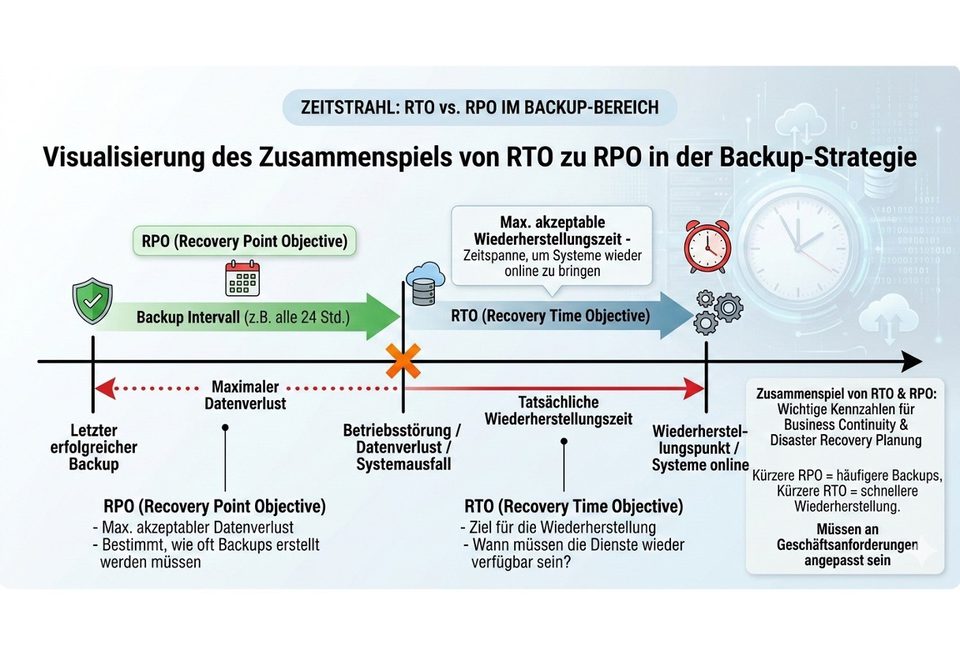
(RTO) is the maximum acceptable downtime. This metric must be backed by tests — not assumptions. Typical RTOs by backup architecture:
| Architecture | Typical RTO (full restore) | Passed practical test? |
|---|---|---|
| Cloud backup | 12 – 72 hours (WAN-dependent) | Rarely tested |
| Hardware air gap (Silent Brick) | 4 – 8 hours | Testable quarterly |
RTO / RPO
RTO (Recovery Time Objective) is the maximum acceptable downtime after an IT failure; RPO (Recovery Point Objective) is the maximum acceptable data loss — both are metrics that must be technically demonstrably met in backup architectures and must not merely be defined as aspirational targets.
8. Implementation: Step by step to protection #
Your 8‑step plan #
| Step | Measure | Timeframe |
|---|---|---|
| 1 | Inventory: Document all backup systems, assess attack surfaces | 1 week |
| 2 | Define RTO/RPO: Document recovery targets per system | 1 week |
| 3 | Plan tier architecture: Which systems need air-gap protection? | 1 week |
| 4 | Select solution: Apply evaluation matrix, check compliance requirements | 2 weeks |
| 5 | Pilot implementation: Test representative workloads over 4 weeks | 4 weeks |
| 6 | Test recovery: Full restore test before go-live | 1 week |
| 7 | Documentation: Update BSI CON.3, create recovery runbook | 1 week |
| 8 | Operations: Monitoring, quarterly recovery tests, annual architecture reviews | Ongoing |
Avoiding the most common mistakes #
- Mistaking a logical air gap for a real one: Cloud is not an air gap — if an attacker with admin credentials can delete your backup, it is not protection.
- Neglecting backup tests: A backup without a restore test is a hope system.
- Not verifying RTO: Your RTO must be demonstrated through tests, not assumed.
- Using the same credentials: Backup systems need their own, separate administrator accounts.
WORM
WORM (Write Once, Read Many) refers to a storage principle in which data is written once and can technically no longer be altered or deleted — in hardware WORM, this immutability is a physical property of the storage controller, independent of software, operating system or user privileges.
According to Bitkom 2024, a successful ransomware attack causes an average of EUR 5.3 million in damage — this figure is an estimate based on aggregated total damage data. Actual costs vary significantly by organization size, sector, and response speed. Sophos 2024 documents that 65% of victims needed more than a week for complete recovery.
Immutable storage protects data from modification or deletion through software policies. An air gap physically separates data from the network. The decisive difference: immutability policies can be overridden by an attacker with compromised administrator credentials. A physical air gap cannot — because the system has no network connection in its offline state.
No. Cloud backups are reachable via API credentials. An attacker who compromises your cloud IAM permissions can also delete cloud backups — including -protected buckets, if MFA is not consistently enforced. Cloud backup is a useful supplementary protection layer, but it is not a substitute for a physical air gap.
Immutable Storage
Immutable storage refers to storage technologies that protect stored data from subsequent alteration or deletion — where the decisive difference lies in whether this protection is enforced at the hardware level (cannot be circumvented) or at the software level (can be circumvented by administrators with sufficient rights).
BSI recommends in its ransomware recommendations and building block CON.3: offline backups (physically disconnected from the network), regular recovery tests, separate administrator accounts for backup systems, and network segmentation. For organizations with elevated protection requirements, CON.3.A14 explicitly requires physical separation of backup media.
BSI IT-Grundschutz
The BSI IT-Grundschutz is a framework developed by the German Federal Office for Information Security (BSI) with standardized security requirements for IT systems — for KRITIS operators, NIS2-affected organizations and public authorities, it is the central reference for demonstrable IT security measures.
For disk-based air-gap systems like the Silent Brick System, the typical is 4-8 hours for full . Older tape-based solutions typically require 24-96 hours. The difference lies in access speed: disks enable random access, tapes only sequential reading.
RTO / RPO
RTO (Recovery Time Objective) is the maximum acceptable downtime after an IT failure; RPO (Recovery Point Objective) is the maximum acceptable data loss — both are metrics that must be technically demonstrably met in backup architectures and must not merely be defined as aspirational targets.
Disaster Recovery
Disaster recovery refers to the structured processes and technical measures that ensure IT systems can be restored within defined timeframes (RTO) with maximum data loss (RPO) after a severe failure — ransomware attack, hardware failure or data center outage.
No. A system like the Silent Brick System integrates via standard interfaces (FC, iSCSI, NFS, SMB, S3) into your existing backup infrastructure. It works with all common backup solutions — Veeam, Commvault, Veritas NetBackup, IBM Spectrum Protect, and others.
Air Gap
An air gap is the complete physical interruption of all network connections between a backup system and the rest of the IT infrastructure, so that the system has no addressable network interface in its offline state and is therefore unreachable by ransomware and attackers.
An air gap protects your recovery capability — it prevents an attacker from destroying your backups. It does not directly protect against the data theft aspect of double extortion; for that, measures like network segmentation, data loss prevention, and encryption of sensitive data are needed. But the air gap ensures that after an attack you remain operationally capable — without having to pay a ransom.